
chart:documents
Chart Documents
There are many type of documents on a patient chart.
We sort them into several panels depending on the type of document. The sorting is done during document tagging.
- Investigation, Lab, Pathology, Report
- Radiology
- Consult Letters, Referral Letters
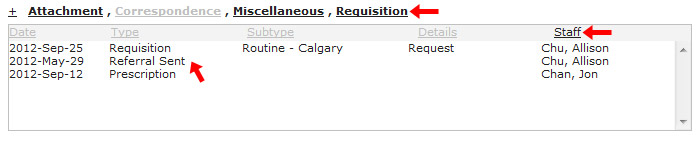
- Attachments, Correspondence, Miscellaneous, Requisition

Most of the document windows work the same way.
- You can filter which types to show by clicking on the title. Black means show, gray means hide.
- In the example, we are hiding correspondence.
- You can sort by any column.
- In the example, we are sorting by staff.
- To view the document, just double click the line item.
chart/documents.txt · Last modified: 2012/09/25 20:51 by jackson


